

Expenses
As an operator, you will be able to record an expense with its attachment and the correct expense and tax accounts, so that the cost lands in the right GL account with a verifiable document and recoverable input VAT for MoF 2020 filing.
What you'll accomplish
As an Operator, you will be able to record an expense with its attachment and the correct expense and tax accounts, so that the cost lands in the right GL account with a verifiable document and recoverable input VAT for MoF 2020 filing.
Before you start
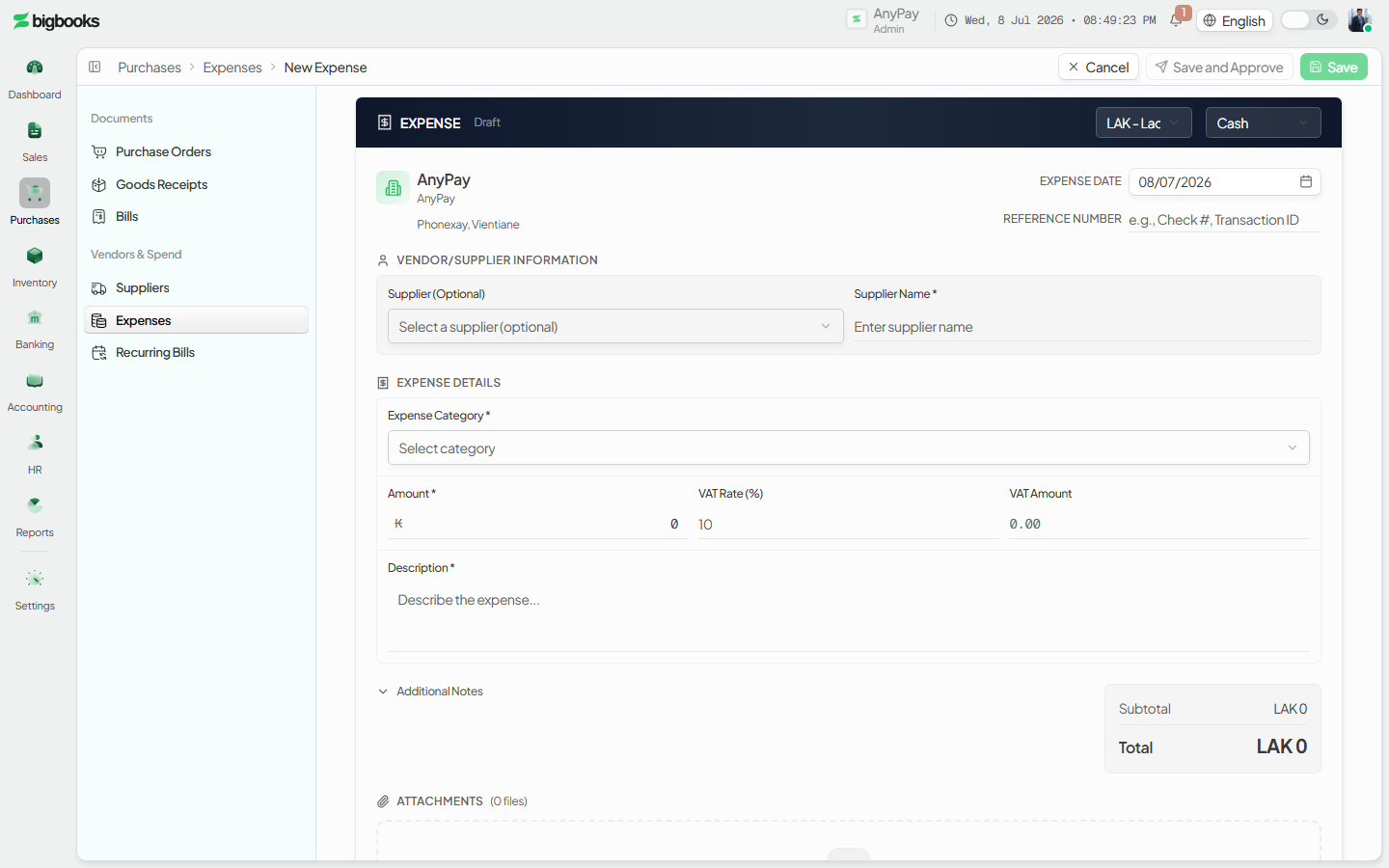
The expense list at /[lang]/expenses is where day-to-day costs (utilities, supplies, services) are captured outside the formal purchase-order flow. The screen opens on a stats strip (totals by status) over a filterable table; on a company with no expenses yet, an illustrated first-run empty state invites you to record the first one. Clicking a row opens its detail page; New expense opens the editor at /[lang]/expenses/new. Each line carries an expense account and a tax treatment; amounts are stored as integer satang in LAK so the posted journal agrees to the satang.
Compliance Note
Attaching the supplier receipt or bill makes the expense audit-ready and supports the input-VAT claim that MoF 2020 requires.
Steps
Open the expense editor
From /[lang]/expenses, choose New expense to open /[lang]/expenses/new (the first-run empty state offers the same action).
Fill in the details
Pick the supplier, choose the expense account and VAT rate per line, set the payment method, attach the receipt, and confirm.
Verify saving
The expense is saved with its attachment and the net, VAT, and gross amounts shown to the satang, and it appears as a row back on the list.
What happens behind the scenes
Confirming an expense builds a journal entry (created as a draft that posts on confirmation/approval). With a recoverable VAT line:
| Account | Debit | Credit |
|---|---|---|
| Expense Account | Net Amount | - |
| Input VAT | VAT Amount | - |
| Cash / Bank / Accounts Payable | - | Gross Amount |
The credit account is chosen by payment method: cash pays the cash account, cheque/transfer/card pays the bank account, and a credit (on-account) expense credits the supplier's Accounts Payable.
Note on Non-recoverable / no-VAT expenses: If the expense has no VAT or a non-recoverable tax treatment, the full gross is debited to the expense account with no Input VAT line.
Common problems
- Missing attachment prompts a warning where receipts are mandatory.
- Missing info: Expense account or tax rate left blank blocks confirmation.
- Mismatch: Net + VAT not reconciling to the entered gross flags a mismatch.
- Closed Period: Posting into a closed period is blocked.
- FX Rate: Foreign-currency expense without an FX rate is blocked.
- Permissions: Operator lacking expense-posting permission sees a restricted state.
Receipts
As an operator, you will find and open a receipt, switch its layout between the Official and Branded template, and download or print it — without changing the payment behind it.
Pay Suppliers & Recurring Payables
As an operator, you will be able to pay a supplier and set up a recurring payable that drafts itself each cycle, so that regular costs like rent and subscriptions are never missed and each posting is reviewed before it hits the GL.